Portable electropalatography (EPG) system
LinguaGraph is a portable electropalatography (EPG) system that monitors tongue contact with the hard palate during speech. It uses a custom-made artificial palate containing 62 electrodes embedded on its lingual surface to capture tongue–palate contact patterns in real time. Trusted by speech professionals and researchers in over 30 countries, LinguaGraph supports both clinical practice and speech research.
How electropalatography works
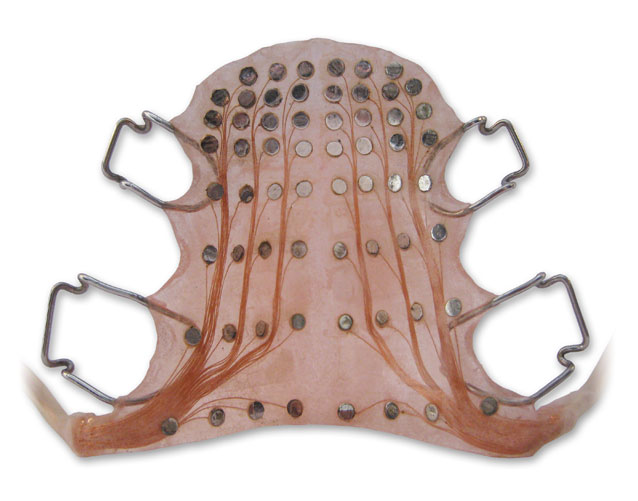
Electropalatography determines tongue-palate contact using a custom-made artificial palate with 62 electrodes embedded on its lingual surface. A small electrical signal is applied to the speaker, which is conducted through the tongue to any touched electrodes. These contact patterns are captured at up to 200 frames per second and displayed in real time, or recorded for offline analysis.
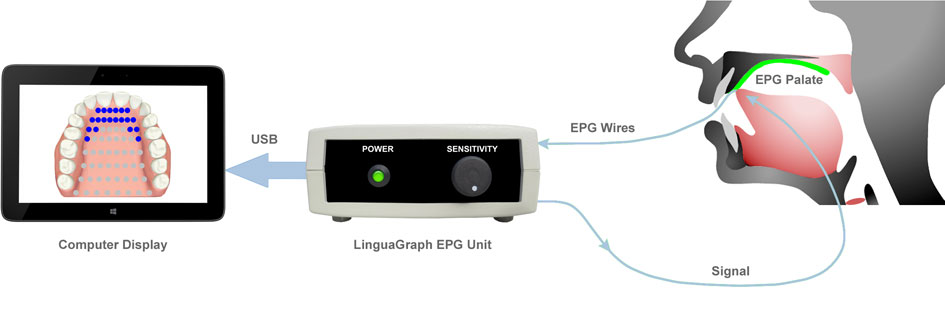
Electropalatography is language-independent and provides direct articulatory information wherever the tongue contacts the hard palate. The tongue–palate contact patterns below illustrate typical lingual consonants produced by English speakers:
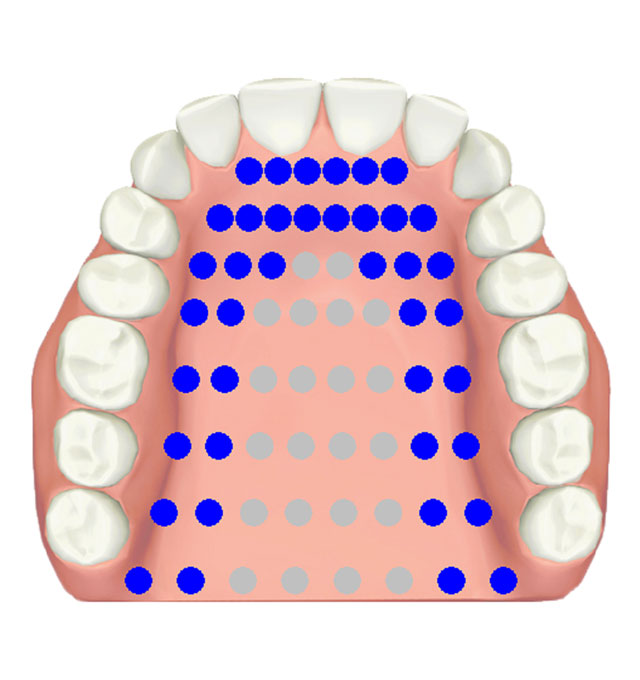
Alveolar Stop
/t/, /d/, /n/
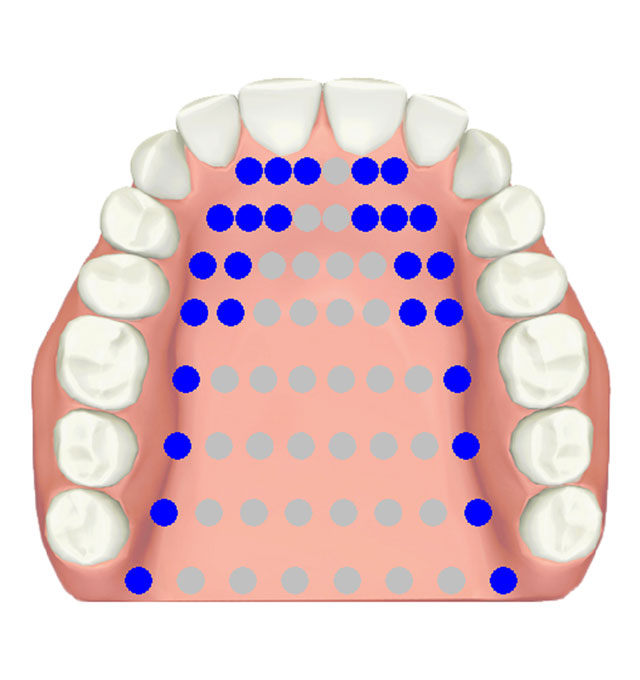
Alveolar Grooved
/z/, /s/
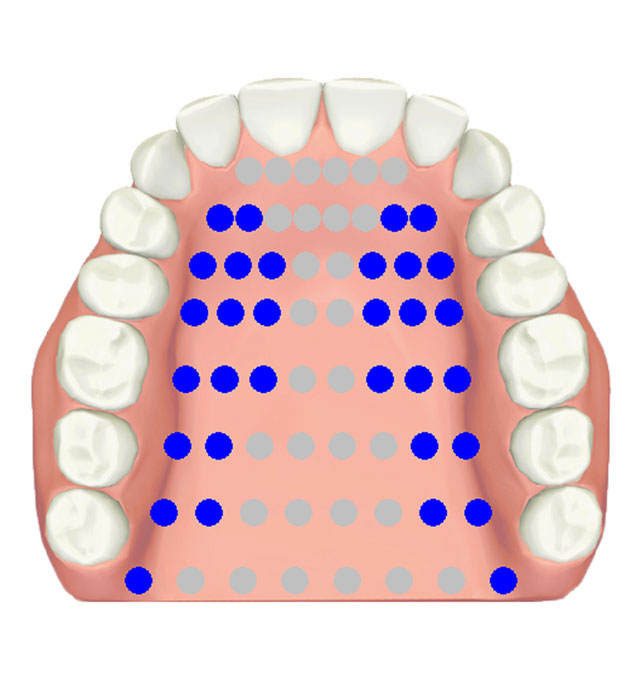
Post-Alveolar Grooved
/ʃ/, /ʒ/
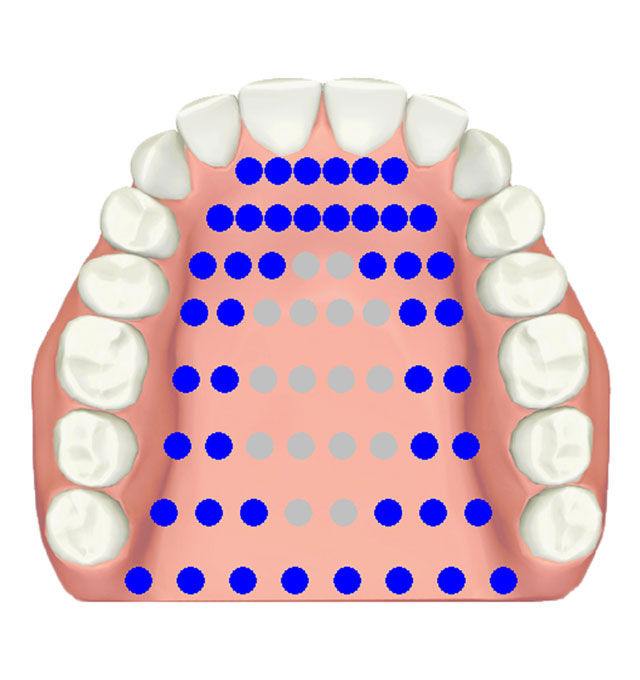
Double Alveolar-Velar
/tk/, /kt/, /kl/
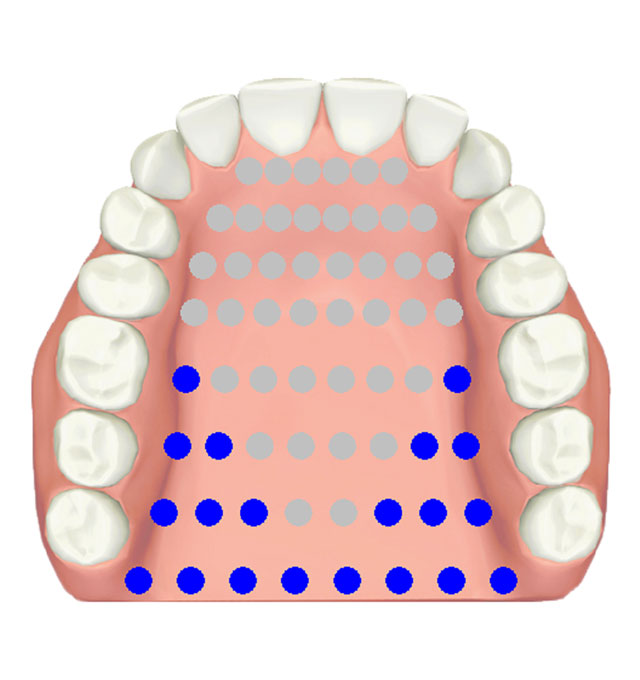
Velar Stop
/k/, /g/, /ŋ/
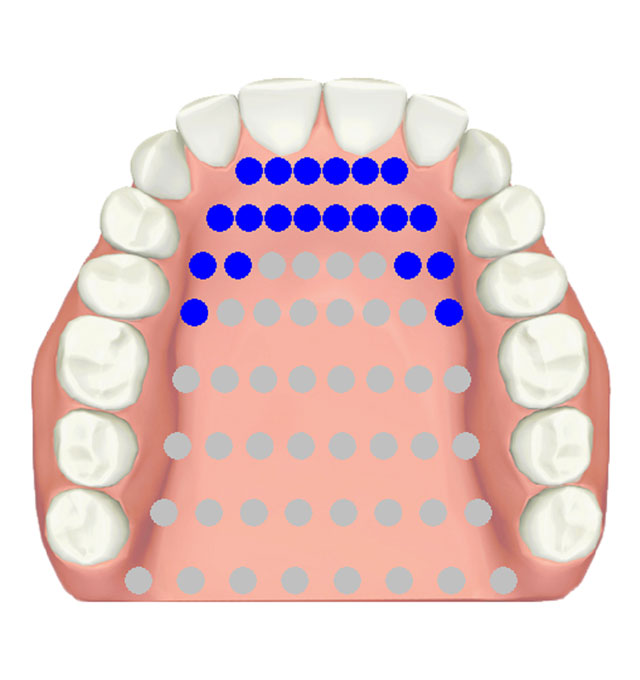
Apical
/l/
Electropalatography palate
LinguaGraph uses the Reading EPG palate design, the established standard in electropalatography, supported by more than 50 years of published research. Each palate is custom-made for the individual speaker and clips securely to the upper teeth. To manufacture an EPG palate, a dental impression of the upper palate and teeth is taken and sent to our specialist dental laboratory. EPG palate kits are also available, enabling orthodontic technologists and dental laboratories to manufacture palates locally.
Who uses electropalatography
LinguaGraph is used by speech professionals and researchers in hospitals, universities, and cleft palate services worldwide to obtain objective tongue-palate contact data across a wide range of speakers and populations.
Why speech professionals choose LinguaGraph
- ✓ Beyond perceptual assessment — perceptual analysis alone cannot reliably identify many articulatory patterns — including lateral bracing, sibilant grooving, posterior lateral contact, and double articulations. Objective visual feedback of tongue–palate contact has been shown to reduce the number of sessions required to establish accurate tongue placement.
- ✓ Measures what ultrasound cannot — EPG directly captures tongue–palate contact patterns that midsagittal ultrasound cannot show — including lateral bracing, sibilant grooving, and posterior lateral contact.
- ✓ Three software options — works with LinguaView, LinguaView 3D and icSpeech Professional Edition, offering real-time displays, 3D EPG visualisation, biofeedback games and offline analysis.
- ✓ Multiparameter EPG recording — icSpeech Professional Edition supports the simultaneous recording of EPG contact patterns, ultrasound tongue imaging, electroglottography, nasometry, airflow, audio and video in a single, easy-to-use interface.
- ✓ 25+ years of published research — LinguaGraph has featured in peer-reviewed research and published studies in phonetics and speech science worldwide.
- ✓ Portable and USB powered — no external power supply required. Connects to any Windows desktop, laptop or tablet. Suitable for clinical rooms, research labs and remote settings.
- ✓ Sold in over 30 countries — trusted by universities, hospitals, and research institutions worldwide, built on nearly 40 years of speech technology development.


























- Great Ormond Street Hospital
- Oxford University Hospitals — The Spires Cleft Centre
- Manchester University NHS Foundation Trust
- Salisbury NHS Trust — The Spires Cleft Centre
- The Newcastle upon Tyne Hospitals
- Royal Belfast Hospital for Sick Children
- Moor House School and College
- Meath School
- Trinity College Dublin
- Copenhagen Cleft Palate Centre
- Aarhus University
- University of Zurich
- Université Sorbonne Nouvelle
- Laboratoire de Phonétique et Phonologie
- Universidad de Valencia
- Catholic University of Valencia
- Cyprus University of Technology
- Statped, Norway
- University Health Network, Toronto
- Grand Valley State University
- University of Florida
- Université de Paris
- Shanghai Normal University
- The University of Tokyo
- Osaka Health Science University
- Hong Kong Baptist University
- City, University of London
- Penn Medicine
Software options
LinguaView
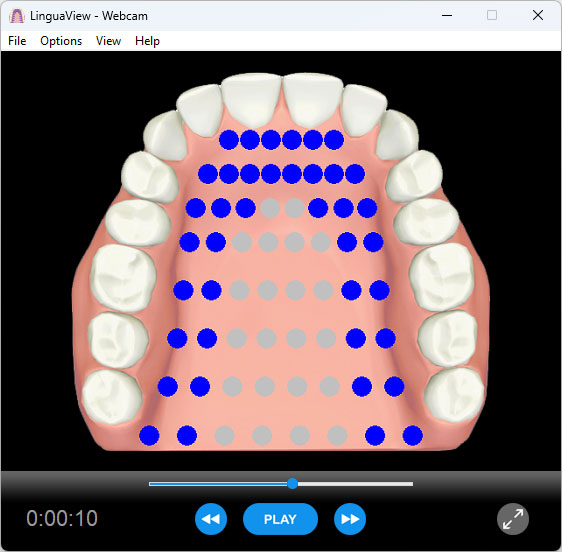
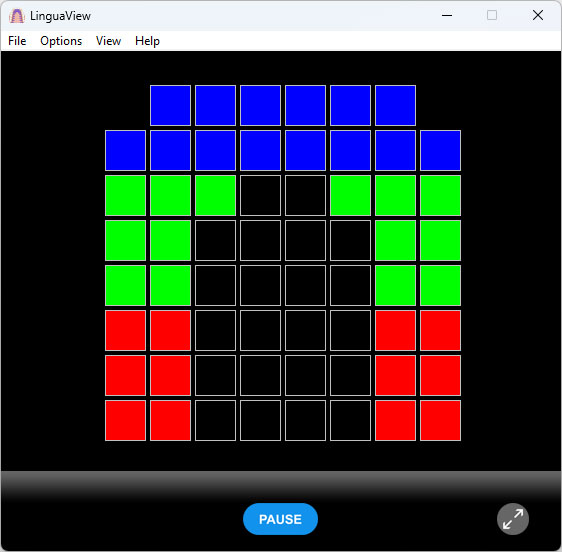
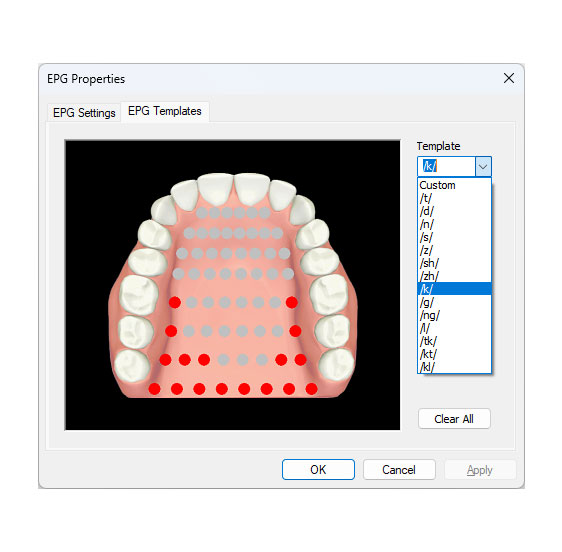
LinguaView is Windows software designed for real-time EPG display and recording. It is well suited to clinical settings and as an introduction to electropalatography.
- Preview EPG in real-time
- Record EPG with synchronised audio
- Playback EPG with synchronised audio
- EPG template library — store and recall typical contact patterns for comparison
- EPG template editor — create and edit custom contact pattern templates
- Export recordings as standard WMV video files for easy sharing — no specialist software required
- Anatomical or classic palatograph displays
- Adjustable palatogram segment colour, including regional colour coding for alveolar, palatal and velar zones
- Compatible with videoconferencing software for remote operation
- Windows 10 and 11 compatible
LinguaView 3D
LinguaView 3D uses computer animation and 3D modelling techniques to illustrate tongue-palate contact during speech. Unlike conventional EPG displays, the 3D model helps users visualise tongue placement more naturally, making it particularly effective for younger speakers. The model consists of the tongue, hard palate, teeth and lower jaw, with adjustable transparency and 360° rotation.
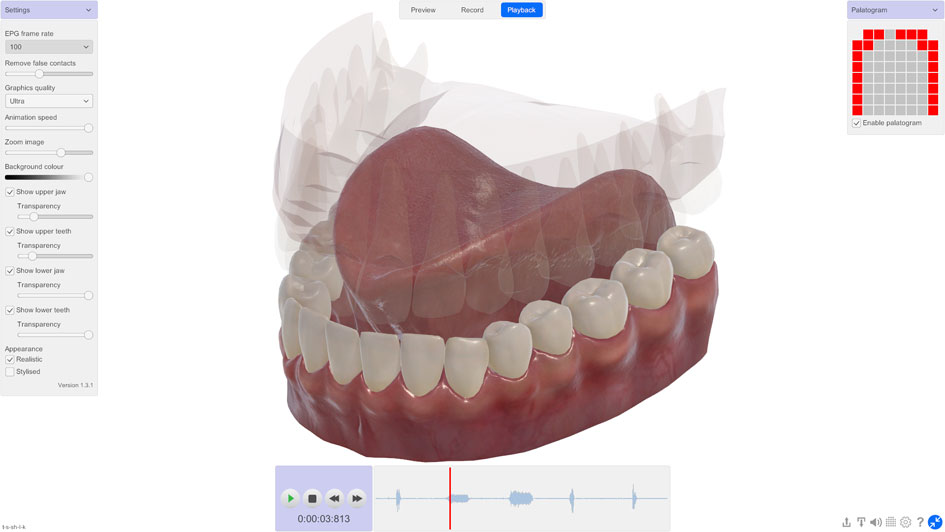
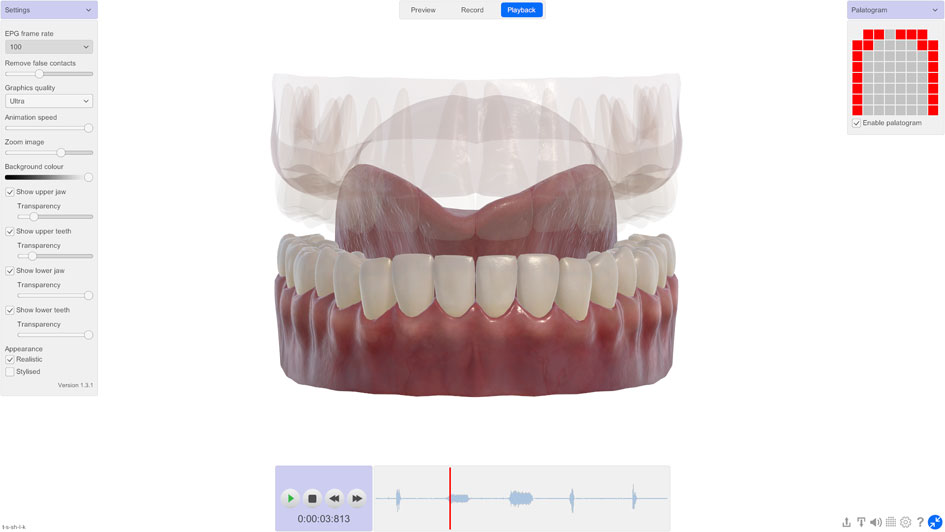
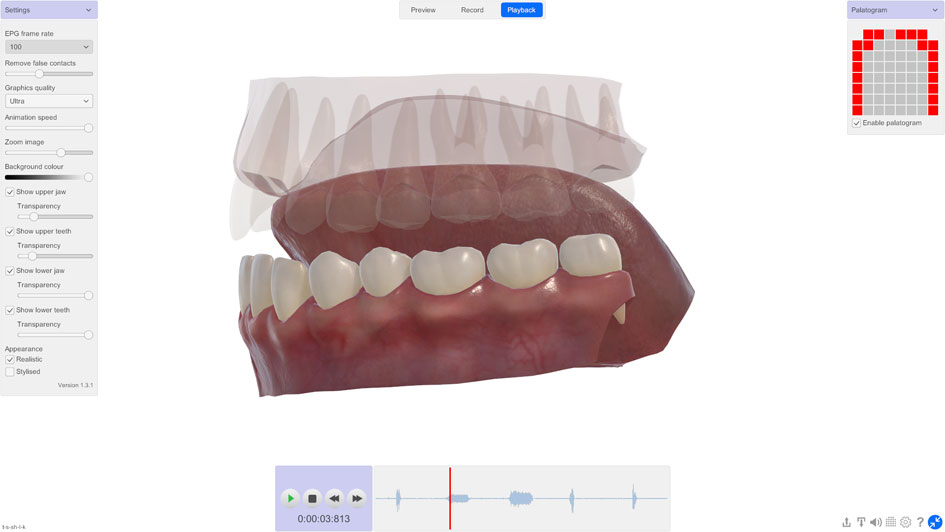
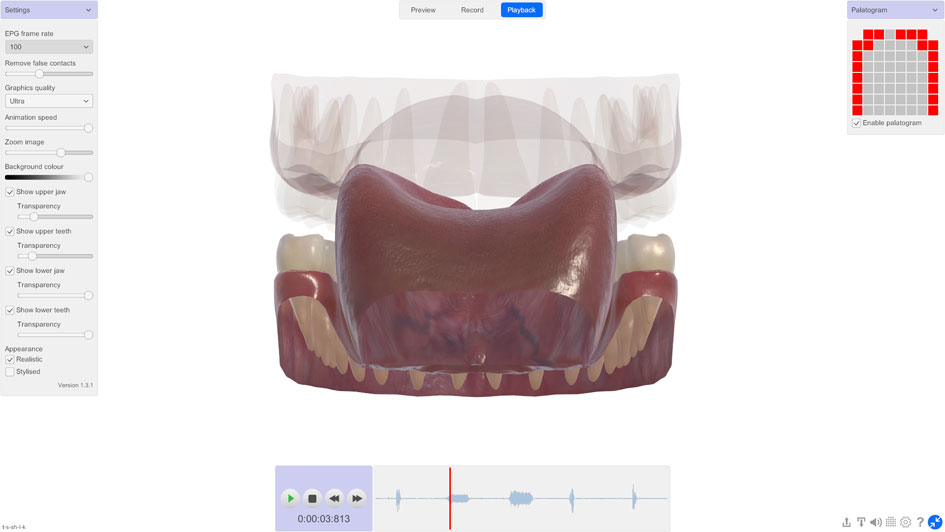
The 3D contact patterns below illustrate typical lingual consonants produced by English speakers:
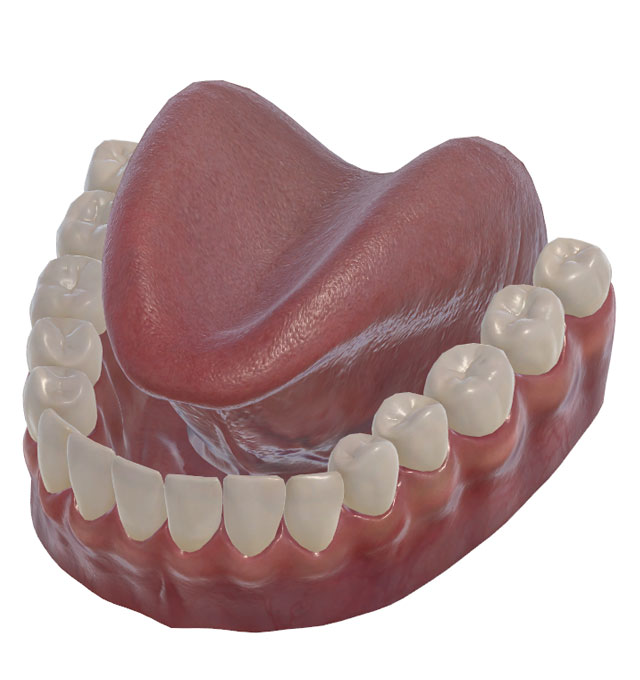
Alveolar Stop
/t/, /d/, /n/
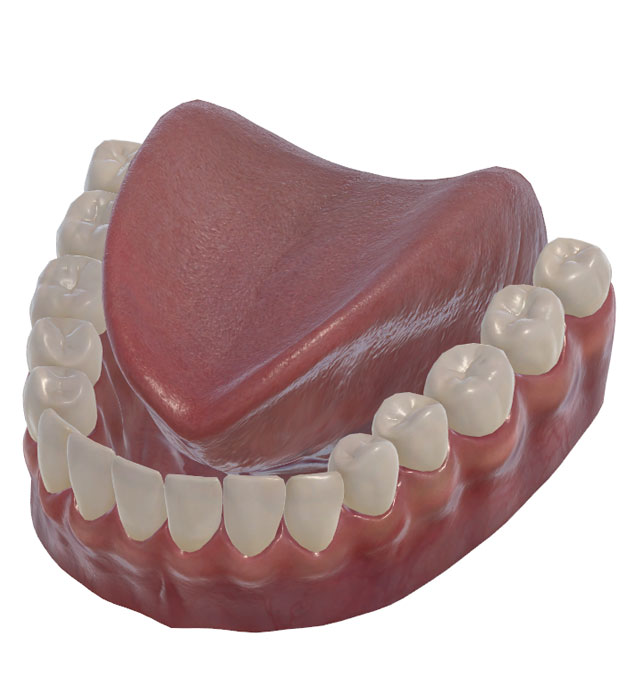
Alveolar Grooved
/z/, /s/
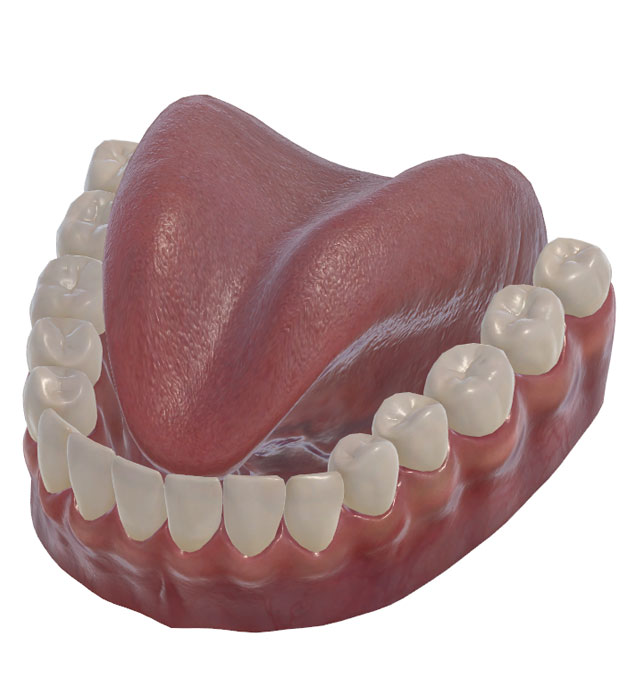
Post-Alveolar Grooved
/ʃ/, /ʒ/
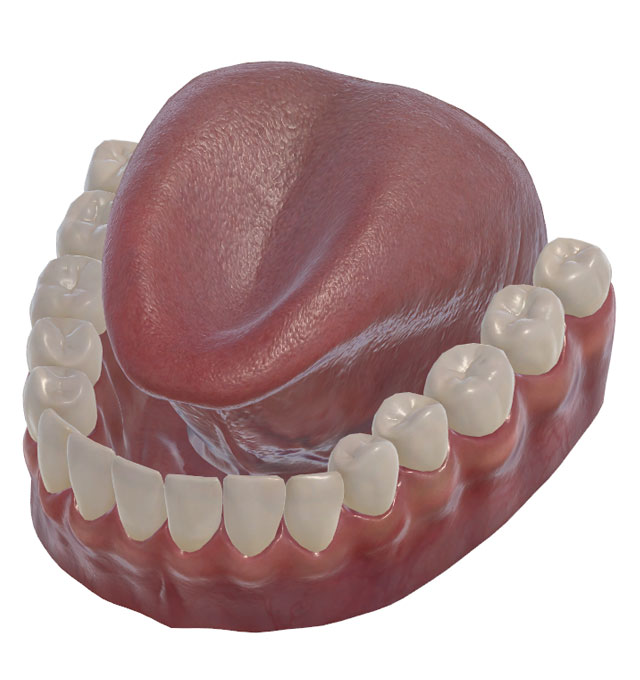
Double Alveolar-Velar
/tk/, /kt/, /kl/
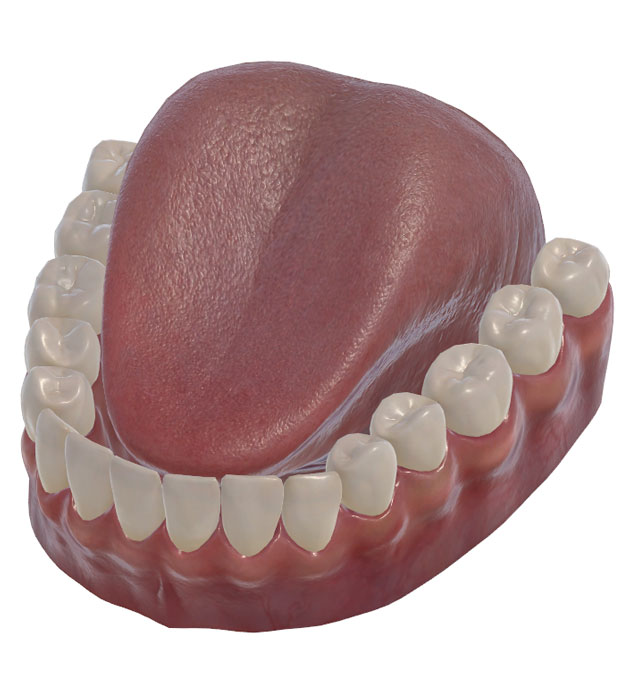
Velar Stop
/k/, /g/, /ŋ/
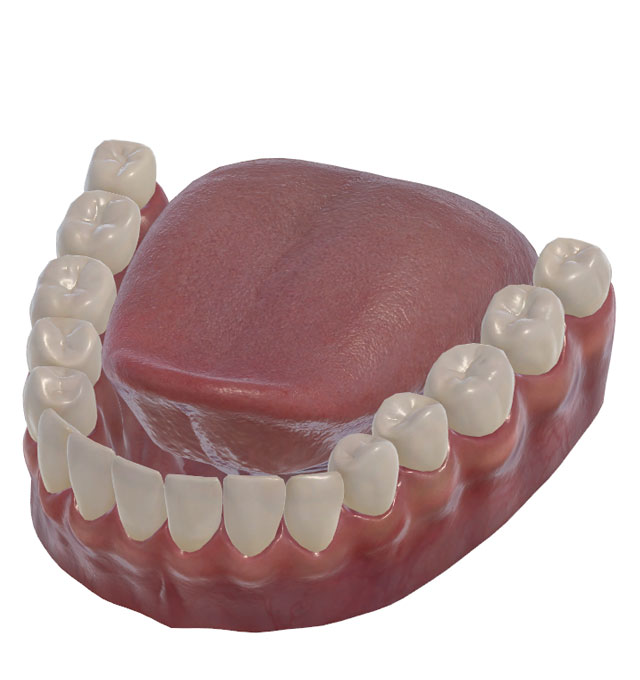
Apical
/l/
- Real-time 3D animated model of tongue-palate contact
- Record 3D tongue-palate contact with synchronised audio
- Auditory playback synchronised with 3D model
- EPG template library — store and recall typical 3D contact patterns for comparison
- EPG template editor — create and edit custom 3D contact pattern templates
- Photorealistic and stylised views with adjustable articulator transparency
- 360° model rotation
- File format compatible with icSpeech Professional Edition
- Windows 10 and 11 64-bit compatible
icSpeech Professional Edition
icSpeech Professional Edition is a comprehensive speech visualisation and analysis package that significantly extends the capabilities of LinguaGraph. It provides a wider range of EPG displays, including lingual waveforms, dynamic bar charts, and spectrograms. The integrated data recorder supports picture and word prompting, while six interactive biofeedback games help engage younger speakers. Extensive analysis and export features support both clinical practice and research. The software also supports multiparameter recording, allowing EPG data to be synchronised with ultrasound tongue imaging, electroglottography (EGG), nasometry, airflow, and video.
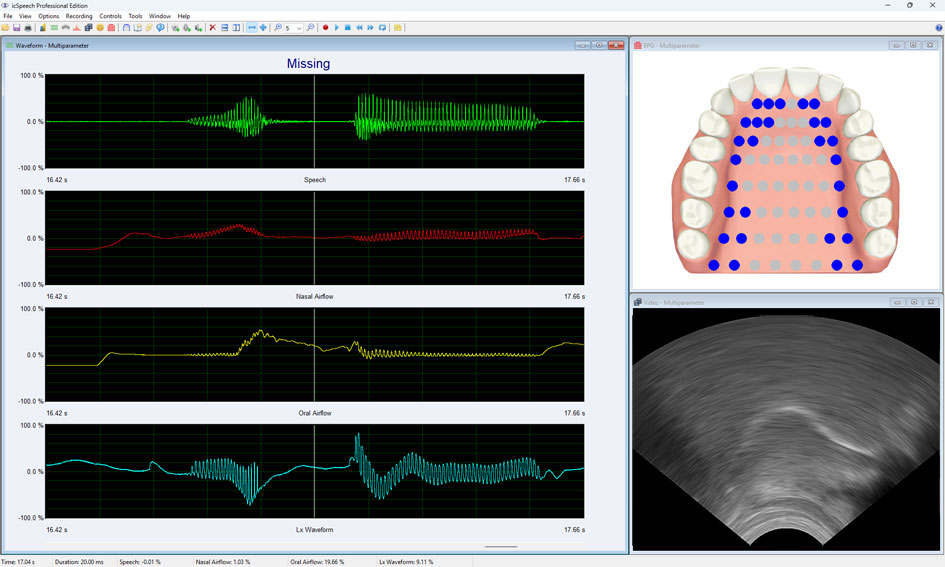
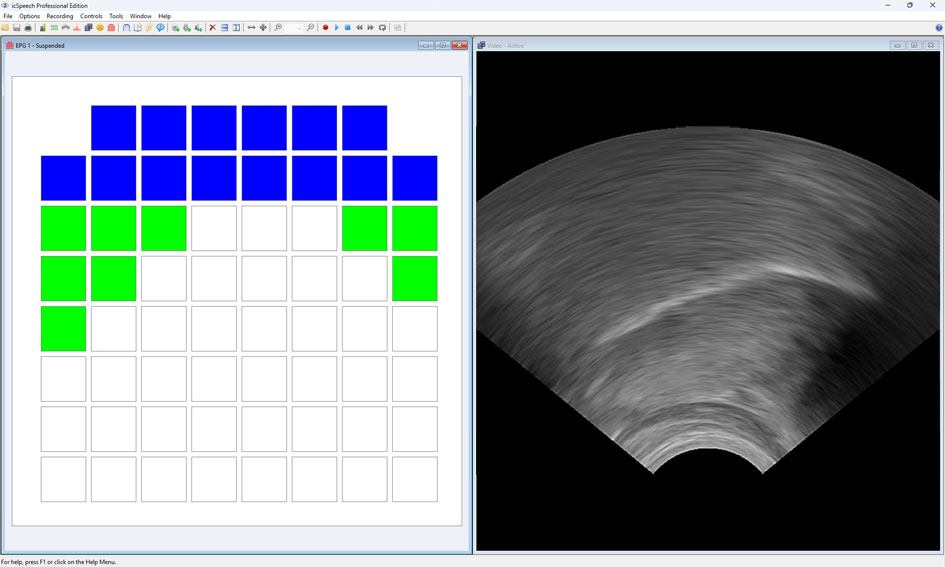
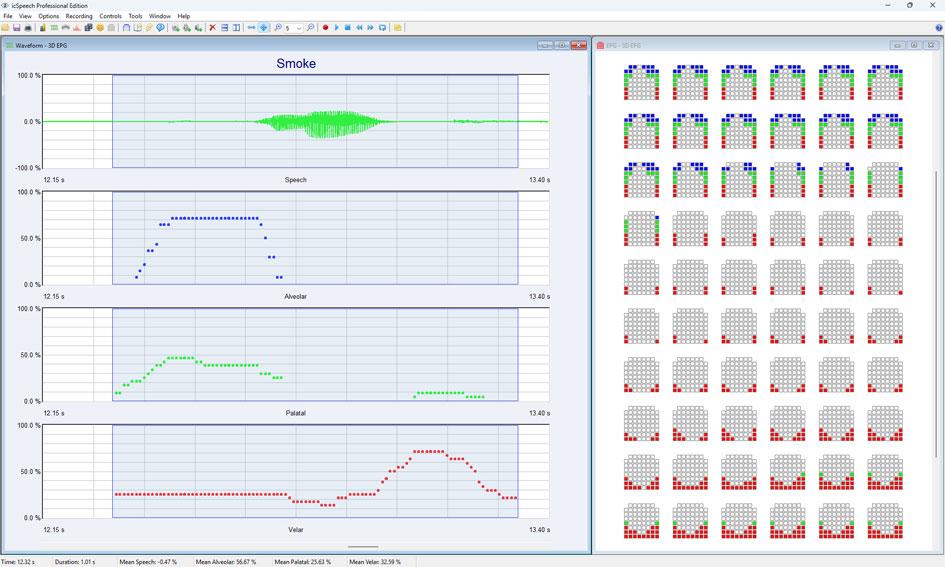
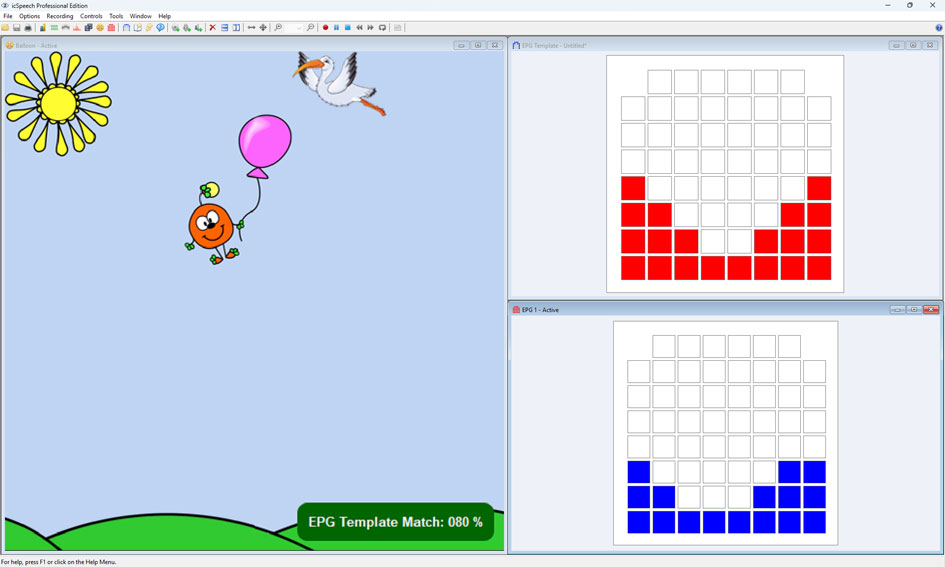
- EPG displays including waveforms, dynamic bar charts and spectrograms
- Anatomical or classic palatograph displays
- Lingual parameters derived from palate contact regions — used in real-time display, biofeedback games, and CSV export
- Data recorder with picture and text prompting
- Import or create custom text and picture prompts
- Six biofeedback games with adjustable targets and rewards
- Compare multiple recordings simultaneously
- EPG template matching — compare recorded contact patterns against stored targets
- Export raw EPG data to CSV for external processing
- Combines EPG with ultrasound tongue imaging, electroglottography (EGG), nasometry, airflow and video
- Multi-channel EPG — connect multiple LinguaGraph units, enabling simultaneous display for two speakers
- Annotate recordings with subject name, ID and comments for session tracking and research
- Windows 10 and 11 compatible
Lingual parameters
By dividing the EPG palate into distinct regions, icSpeech Professional Edition derives ten lingual parameters. These parameters can be quantified numerically or visualised as waveforms, dynamic bar charts, and biofeedback games, providing targeted feedback for specific regions of the palate.
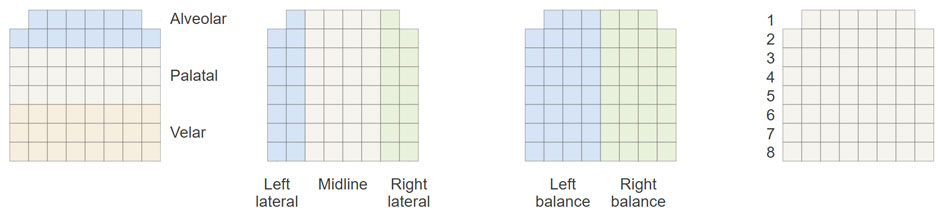
| Parameter | Description |
|---|---|
| Alveolar | Percentage of electrodes contacted in the alveolar region (front two rows of the palate) |
| Palatal | Percentage of electrodes contacted in the palatal region (middle three rows of the palate) |
| Velar | Percentage of electrodes contacted in the velar region (rear three rows of the palate) |
| Left Lateral | Percentage of electrodes contacted in the left lateral region (left two columns of the palate) |
| Right Lateral | Percentage of electrodes contacted in the right lateral region (right two columns of the palate) |
| Midline | Percentage of electrodes contacted in the midline region (centre four columns of the palate) |
| Centre of Gravity | Linear centre of gravity of the total contact region, from front (100%) to rear (0%) of the palate |
| Balance | Balance of tongue-palate contact from left (−100%) to right (+100%); 0% indicates symmetrical contact |
| Weight | Percentage of the 62 electrodes contacted across the entire palate |
| Template Match | Similarity between the current contact pattern and a target template; 0% = no match, 100% = perfect match |
Software comparison table
| Feature | LinguaView | LinguaView 3D | icSpeech Professional Edition |
|---|---|---|---|
| Displays | |||
| Real-time EPG display | |||
| Anatomical palatograph display | |||
| Classic palatograph display | |||
| 3D animated tongue-palate model | |||
| Lingual parameters | |||
| Dynamic bar charts | |||
| Spectrograms | |||
| Biofeedback games | 6 | ||
| Multi-channel EPG | |||
| Frame rate | 50 fps | 50, 100, 200 fps | 50, 100, 200 fps |
| Analysis & recording | |||
| Data recorder | |||
| Synchronised audio playback | |||
| Offline analysis | |||
| EPG template library | |||
| EPG template editor | |||
| EPG template matching | |||
| Picture and text prompting | |||
| Import or create custom prompts | |||
| Compare multiple recordings | |||
| Export recordings as WMV video | |||
| Export raw data to CSV | |||
| Multiparameter recording (UTI, EGG, nasometry, airflow, video) | |||
| Annotate recordings with subject name, ID and comments | |||
LinguaGraph SDK (developers)
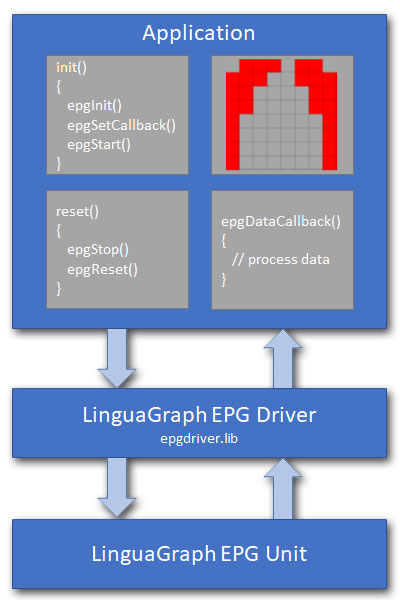
The LinguaGraph software development kit (SDK) is a high-level programming library for creating custom EPG applications. It allows full control of the LinguaGraph EPG unit and real-time access to the EPG frame data. The SDK contains an installation package of redistributable files, programming documentation and example source code. The SDK is compatible with the C/C++ programming language and the Microsoft Visual Studio integrated development environment (IDE).
Minimum Hardware Requirements
- Windows compatible desktop, laptop or tablet computer.
- 1GHz Intel Pentium with 4GB RAM.
- 1 x USB port.
- LinguaGraph EPG unit.
Software Requirements
- Microsoft Windows 10 and 11, x32 and x64 bit.
- Microsoft Visual Studio 2013, or later.
Simple to use API
- int epgInit(LONG lFrameRate, LONG lLatencyMs);
- int epgReset(void);
- int epgStart(void);
- int epgStop(void);
- int epgSetCallback(EPG_CALLBACK epgCallback);
System specification
| Parameter | Value |
|---|---|
| Supported operating systems | Windows 10 and 11 |
| Supported computers | Desktop, laptop, tablet |
| Connectivity | USB 1.0, 2.0, 3.0 |
| Power | USB bus powered |
| Palate type | Reading, 62 electrode |
| Sensitivity | Manual adjustment |
| Frame rate | 50–200 frames per second |
Package contents
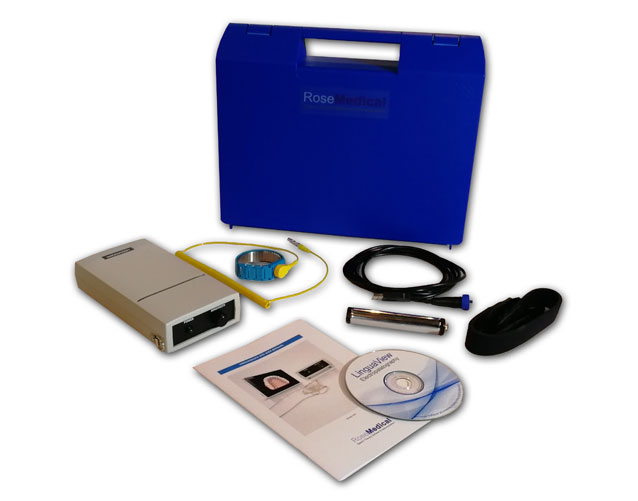
The LinguaGraph EPG unit is supplied as a complete hardware package. The EPG palate is custom-made for each speaker and is ordered separately. Choose from three software options to suit your requirements and budget.
- LinguaGraph EPG unit
- Carry case
- Neck strap
- Wrist strap
- Handgrip
- Signal cord
- 2 metre locking USB cable
- USB card (software, licence keys, user manual and warranty documentation)
- LinguaView software (optional)
- LinguaView 3D software (optional)
- icSpeech Professional Edition software (optional)
Frequently asked questions
Yes. LinguaGraph is widely used with children, including in school-based programmes, university clinics, and cleft palate services. The biofeedback games, regional colour coding, and the 3D tongue model make it particularly engaging and intuitive for younger speakers. However, several factors should be considered when using EPG with children:
Minimum age — The EPG palate clips to the upper teeth and requires a stable dentition for accurate fitting and reliable retention. Deciduous dentition is generally established by around 3.5 years and stable until approximately 6 years, making 6 years a practical minimum age for most speakers. Children in the mixed dentition stage (6–13 years) may require palate alteration or replacement as their dentition changes.
Cognitive ability — EPG requires the speaker to understand the relationship between tongue placement and the visual display. A certain level of cognitive ability is a prerequisite for effective use, as noted in the Cochrane review of EPG therapy (Lee et al., 2009).
Acclimatisation — A practice palate, which contains no electrodes or lead out wires, can be used to help speakers adjust to wearing the EPG palate before sessions begin. Increased saliva production is common initially and usually settles with acclimatisation.
A practice palate is a custom-made palate that contains no electrodes or lead-out wires. It is used to help speakers acclimatise to wearing an EPG palate before sessions begin.
Wearing a practice palate allows the speaker to adjust to the sensation of the palate in the mouth, including the increased saliva production that is common initially. Acclimatisation with a practice palate can reduce the time needed to settle into EPG sessions and reduces the incidence of false contacts caused by excess saliva.
Contact us for further information on practice palates.
Yes — each speaker requires their own custom-made artificial palate. The palate is moulded to fit the individual speaker's hard palate and clips to their upper teeth. Because palate shape varies significantly between individuals, a standard or universal palate is not available.
EPG palates are manufactured from a plaster model of the speaker's upper palate and teeth. A qualified dentist takes an impression using high quality alginate — note that the requirements differ from a general dental impression, as the impression must extend to include the gum area immediately behind the posterior molars to accommodate the lead-out wires. The plaster model is then sent to the laboratory for palate manufacture. Alternatively, an intraoral 3D scan can be used to produce a 3D printed model, which is sent to the laboratory in place of a traditional plaster impression.
EPG palates typically take 2–3 weeks to manufacture from receipt of the plaster model at the laboratory. It is recommended that a photograph of the plaster model is emailed to enquiries@rose-medical.com before sending, to confirm the model is suitable for palate manufacture.
Contact us for further guidance on the impression and plaster model requirements.
Yes. An intraoral 3D scanner can be used to capture a digital record of the speaker's upper palate and teeth, removing the need for a traditional alginate impression. The digital file is used to produce a 3D printed model, which is then sent to the laboratory in place of a traditional plaster cast.
Note that the dental laboratory cannot currently accept digital files directly — a physical model is still required. However, a 3D printed model produced from an intraoral scan is a suitable alternative to a plaster cast and may be more convenient in settings where access to a dentist for impression-taking is limited.
Contact us to discuss this workflow before proceeding.
The EPG palate kit enables an orthodontic technologist to manufacture an EPG palate locally. Each kit contains:
- 62 silver electrodes with attached leads (spare electrodes included)
- EPG connector board
- EPG connector board cover
- Heat shrink tubing
- Instruction manual
The palate kit is particularly useful for institutions with access to an in-house orthodontic technologist, or in countries where shipping time and costs make overseas palate manufacture impractical.
EPG palate kits are available to order from icSpeech. Contact us for further information.
To clean the EPG palate after use, rinse in warm water. If necessary, clean gently with a soft toothbrush and mild detergent, then wipe dry with a soft tissue. Avoid getting the palate connector wet. Always place the palate back on the plaster cast when not in use, and avoid subjecting the wires to undue tension or excessive coiling.
Note that eating salty or sugary foods immediately before wearing the palate can cause false contacts. In these circumstances the speaker should rinse their mouth with water before fitting the palate.
For specific decontamination guidance relevant to your clinical or institutional setting, please contact us.
False contacts are electrodes that appear to register tongue contact even though the tongue is not actually touching that part of the palate. They occur in two main forms:
- Flickering contacts — individual electrodes that randomly activate and deactivate, often rapidly. Most common during the initial acclimatisation period or when the speaker has eaten salty or sugary foods before fitting the palate.
- Sticky contacts — a cluster of adjacent electrodes that remain persistently active regardless of tongue position. Caused by excess saliva bridging a group of electrodes rather than activating them intermittently.
How to minimise false contacts
- Allow at least 15 minutes acclimatisation time before a session
- Ask the speaker to rinse their mouth with water before fitting the palate
- Use a practice palate to aid acclimatisation
- Frequently remove the palate and wipe with a paper tissue
- Avoid eating salty or sugary foods immediately before fitting the palate
- Ensure the sensitivity is correctly adjusted using the sensitivity control on the LinguaGraph unit
- Increase the position of the Remove false contacts slider in the software settings
Electropalatography and ultrasound tongue imaging (UTI) are complementary rather than competing techniques — each captures articulatory information that the other cannot.
EPG measures exactly where and when the tongue contacts the hard palate across 62 electrode positions. It provides precise, quantifiable data on tongue-palate contact patterns, but cannot show tongue shape or movement in areas away from the palate.
Ultrasound shows the shape and movement of the tongue body in real time, including regions that do not contact the palate. However, ultrasound cannot directly measure tongue-palate contact.
A key advantage of EPG is its ability to reveal tongue–palate contact patterns that cannot be directly observed or reliably identified through perceptual analysis alone. Research has shown that lateral fricatives, for example, are easily visualised by EPG but not by midsagittal ultrasound (Cleland et al., 2025).
icSpeech Professional Edition and LinguaGraph can be used simultaneously with ultrasound tongue imaging, allowing both contact patterns and tongue shape to be recorded in a single session.
Yes. LinguaGraph has been used in peer-reviewed research published in international journals, including studies in phonetics, cleft palate speech, verbal dyspraxia, cerebral palsy, and cochlear implant research. When citing LinguaGraph in publications, please reference it as:
LinguaGraph EPG System, icSpeech, Rose Medical Solutions Ltd., Canterbury, UK.
A list of publications featuring icSpeech technology is available on our publications page.
LinguaView, LinguaView 3D, and icSpeech Professional Edition currently support Windows 10 and Windows 11 only. The LinguaGraph hardware uses a standard USB connection and is not platform-restricted, but the software requires Windows. Users working in Mac environments may wish to run Windows via Boot Camp or a virtual machine. Please contact us to discuss your setup.
Yes. LinguaGraph uses the Reading EPG palate design, which is the same design used by WinEPG (Articulate Instruments). Palates manufactured for WinEPG are therefore compatible with LinguaGraph.
Note that Articulate Instruments ceased EPG production in 2013. Existing WinEPG users looking to replace or upgrade their system may wish to consider LinguaGraph as a compatible alternative. Contact us to discuss compatibility with your existing palates.
LinguaGraph connects to a local Windows computer and captures EPG data locally. A speech professional, trained assistant, or researcher can operate the system with the speaker present, while a remote clinician or researcher observes via video call. The EPG display can be shared in real time using screen sharing on any standard videoconferencing platform such as Zoom or Microsoft Teams, allowing a remote clinician or researcher to observe the session live. Recorded EPG data can also be exported and shared for offline review.
Contact us to discuss remote working.
Yes. icSpeech supplies universities, hospitals, and research institutions globally. We provide formal quotations suitable for institutional procurement processes and grant applications. Please use the Get quote form and indicate your institution type. We will respond promptly with appropriate pricing and documentation.
LinguaGraph is compatible with three software options:
- LinguaView — entry-level software for real-time EPG display and recording
- LinguaView 3D — adds a 3D animated tongue-palate model with 360° rotation
- icSpeech Professional Edition — full multiparameter speech analysis platform with EPG displays, biofeedback games, lingual parameters, and simultaneous recording of ultrasound, EGG, nasometry, airflow and video
Developers can also access the LinguaGraph SDK to build custom applications. Contact us for guidance on choosing the right software for your requirements.
Raw EPG data can be exported to CSV (comma-separated values) format using icSpeech Professional Edition. Each row in the CSV file represents an EPG frame, stored as a 64-bit hexadecimal value. A bitmap lookup table is used to extract the individual electrode contact states from each frame.
CSV files can be opened in standard data analysis applications including Microsoft Excel, MATLAB, R, and Python, making the data readily accessible for offline analysis and research.
Contact us for further information on EPG data export, including documentation on the CSV file format.
Intended use: LinguaGraph is a general measurement instrument for use by speech and language professionals, researchers, and educators. It is not intended for use as a medical device for the diagnosis, prevention, monitoring, or treatment of disease.